<symbol />
Overview
The <symbol /> element allows you to create custom schematic representations for your chips. Instead of using the default schematic box with pins, you can draw custom shapes using primitive components like <schematicline />, <schematiccircle />, <schematicrect />, and <schematicarc />.
Most components let you customize their schematic appearance through the symbol prop, where you can combine <port /> elements with drawing primitives to define connection points.
Use <symbol /> when you want to create a custom schematic appearance for your component that differs from the standard rectangular box representation.
Basic Symbol Example
Here's an example creating an NPN transistor symbol using primitive components:
export default () => (
<board width="10mm" height="10mm">
  <chip
    name="Q1"
    symbol={
      <symbol>
        {/* Outer circle */}
        <schematiccircle center={{ x: 0.1, y: 0 }} radius={0.55} isFilled={false} strokeWidth={0.05} />
        {/* Base vertical bar */}
        <schematicline x1={-0.1} y1={-0.5} x2={-0.1} y2={0.5} strokeWidth={0.05} />
        {/* Base input line */}
        <schematicline x1={-0.7} y1={0} x2={-0.1} y2={0} strokeWidth={0.05} />
        {/* Collector line (diagonal then vertical) */}
        <schematicline x1={-0.1} y1={0.2} x2={0.35} y2={0.5} strokeWidth={0.05} />
        <schematicline x1={0.35} y1={0.5} x2={0.35} y2={1} strokeWidth={0.05} />
        {/* Emitter line (diagonal then vertical) */}
        <schematicline x1={-0.1} y1={-0.2} x2={0.35} y2={-0.5} strokeWidth={0.05} />
        <schematicline x1={0.35} y1={-0.5} x2={0.35} y2={-1} strokeWidth={0.05} />
        {/* Emitter arrow (V shape pointing outward along emitter line) */}
        <schematicpath
          strokeWidth={0.05}
          points={[
            { x: 0.16, y: -0.25},
            { x: 0.2, y: -0.40 },
            { x: 0.06, y: -0.44 },
          ]}
        />
        {/* Ports */}
        <port name="B" direction="left" schX={-0.7} schY={0} />
        <port name="C" direction="up" schX={0.35} schY={1} />
        <port name="E" direction="down" schX={0.35} schY={-1} />
      </symbol>
    }
  />
</board>
)
Symbols with Connections
You can create multiple chips with custom symbols and connect them via the connections prop. Here's a buffer driving an inverter:
export default () => (
<board width="10mm" height="10mm">
  {/* Buffer (triangle) */}
  <chip
    schX={0}
    schY={0}
    name="U1"
    symbol={
      <symbol>
        <schematicline x1={-0.5} y1={-0.6} x2={-0.5} y2={0.6} strokeWidth={0.05} />
        <schematicline x1={-0.5} y1={0.6} x2={0.5} y2={0} strokeWidth={0.05} />
        <schematicline x1={0.5} y1={0} x2={-0.5} y2={-0.6} strokeWidth={0.05} />
        {/* Input line on left */}
        <schematicline x1={-1} y1={0} x2={-0.5} y2={0} strokeWidth={0.05} />
        {/* Output line on right */}
        <schematicline x1={0.5} y1={0} x2={1} y2={0} strokeWidth={0.05} />
        <port name="pin1" direction="right" schX={1} schY={0} />
      </symbol>
    }
  />
  {/* Inverter (triangle with bubble) */}
  <chip
    schX={4}
    schY={0}
    name="U2"
    symbol={
      <symbol>
        <schematicline x1={-0.5} y1={-0.6} x2={-0.5} y2={0.6} strokeWidth={0.05} />
        <schematicline x1={-0.5} y1={0.6} x2={0.5} y2={0} strokeWidth={0.05} />
        <schematicline x1={0.5} y1={0} x2={-0.5} y2={-0.6} strokeWidth={0.05} />
        <schematiccircle center={{ x: 0.65, y: 0 }} radius={0.15} strokeWidth={0.05} isFilled={false} />
        {/* Input line on left */}
        <schematicline x1={-1} y1={0} x2={-0.5} y2={0} strokeWidth={0.05} />
        {/* Output line on right (after bubble) */}
        <schematicline x1={0.8} y1={0} x2={1.3} y2={0} strokeWidth={0.05} />
        <port name="pin1" direction="left" schX={3} schY={0} />
      </symbol>
    }
    connections={{
      pin1: ".U1 > .pin1",
    }}
  />
</board>
)
Reference Designator Substitution
You can use {NAME}, {REF}, or {REFERENCE} in the text property of a <schematictext /> element. When the schematic is rendered, these variables are automatically replaced with the name (reference designator) of the component it belongs to.
This is particularly useful when creating custom symbols for components like chips.
export default () => (
<board width="20mm" height="20mm">
  <chip
    name="U1"
    pcbX={0}
    pcbY={0}
    symbol={
      <symbol>
        <schematictext schX={0} schY={1} text="{NAME}" fontSize={0.2} />
        <schematicline
          x1={-0.5}
          y1={-0.7}
          x2={-0.5}
          y2={0.7}
          strokeWidth={0.05}
        />
        <schematicline
          x1={-0.5}
          y1={0.7}
          x2={0.7}
          y2={0}
          strokeWidth={0.05}
        />
        <schematicline
          x1={0.7}
          y1={0}
          x2={-0.5}
          y2={-0.7}
          strokeWidth={0.05}
        />
        <schematictext schX={-0.35} schY={0.35} text="+" fontSize={0.3} />
        <schematictext schX={-0.35} schY={-0.35} text="-" fontSize={0.3} />
        <port
          name="IN_POS"
          schX={-1}
          schY={0.35}
          direction="left"
          schStemLength={0.5}
        />
        <port
          name="IN_NEG"
          schX={-1}
          schY={-0.35}
          direction="left"
          schStemLength={0.5}
        />
        <port
          name="OUT"
          schX={1.2}
          schY={0}
          direction="right"
          schStemLength={0.5}
        />
      </symbol>
    }
  />
</board>
)
Available Schematic Drawing Components
Within a <symbol />, you can use the following primitive components to draw your custom schematic representation:
<port />- Define connection points<schematicrect />- Draw rectangles and boxes<schematiccircle />- Draw circles<schematicline />- Draw straight lines<schematicpath />- Draw connected path segments<schematicarc />- Draw circular arcs
Viewing Symbol Ports
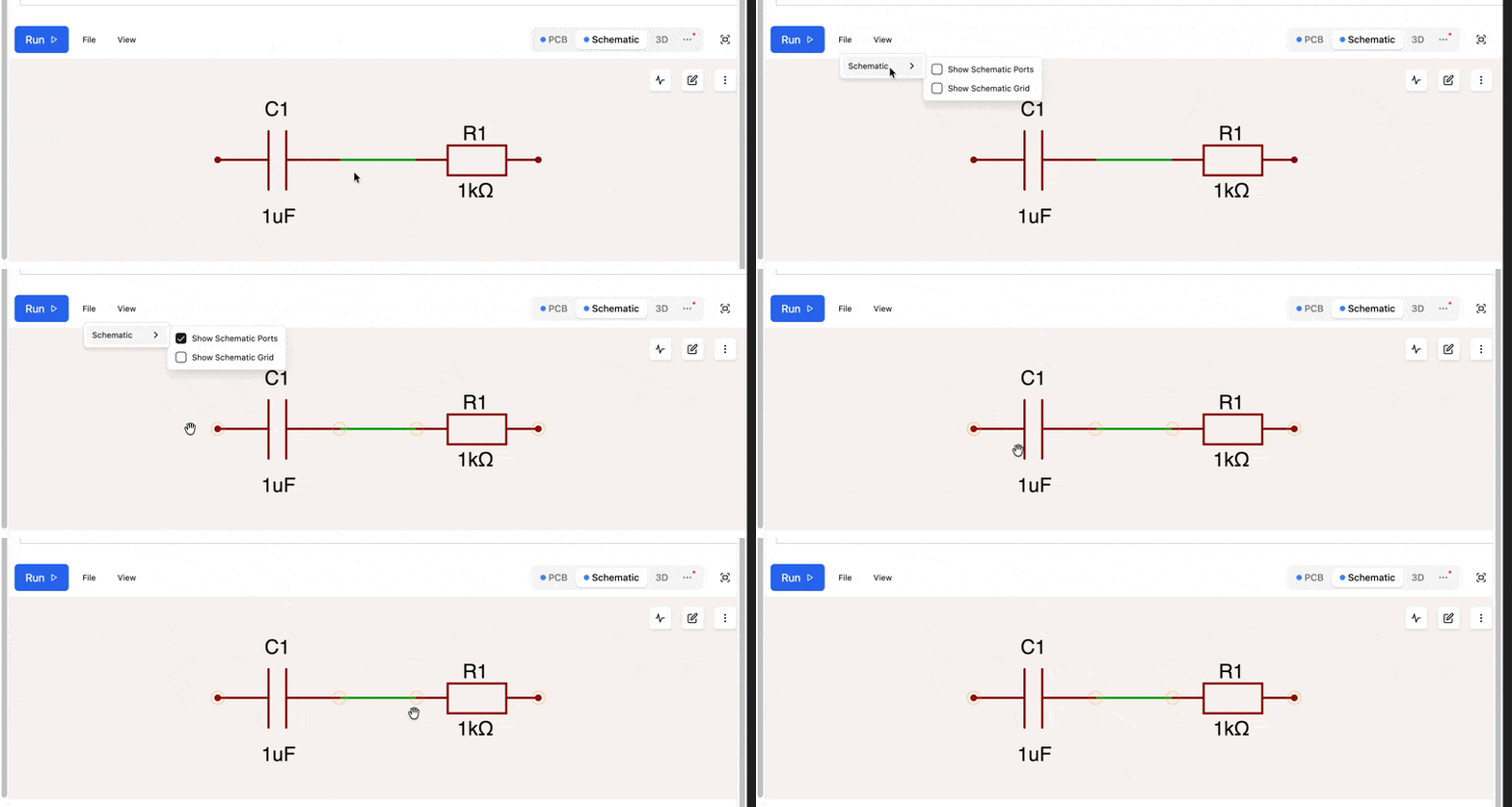
To visualize the port positions on your schematic symbols, go to View > Schematic > Show Schematic Ports in the editor: